
How to Make a 2026-2027 School Year Calendar in Canva (Semester by Semester)
Build a printable 2026-2027 school year calendar in Canva: generate each month or semester with Calendar Maker, mark breaks and exam weeks, and print or share it as a PDF.
A school year doesn't match the calendar year. It starts in August or September, runs through the winter break, and ends in May or June, so a standard January-to-December template never quite fits. Canva's built-in calendar templates are fine for a quick look, but they are set up for the calendar year, and rearranging them for a different start month means a lot of manual editing. This guide shows a faster way: generate the exact months you need with the Calendar Maker app, then mark the dates that matter and print it.
You'll end up with a clean 2026-2027 school year calendar you can print for the classroom wall, hand to families, or keep as a digital planner.
What you need #
- A free Canva account (the Calendar Maker app is installed from the Apps panel; some features need its Pro unlock)
- Your school's key dates: first day, breaks, holidays, exam weeks, last day
- 10 to 15 minutes
Step by step #
- Open a new design. In Canva, create a design at US Letter or A4 landscape. One month per page is easiest to read; one semester per page also works.
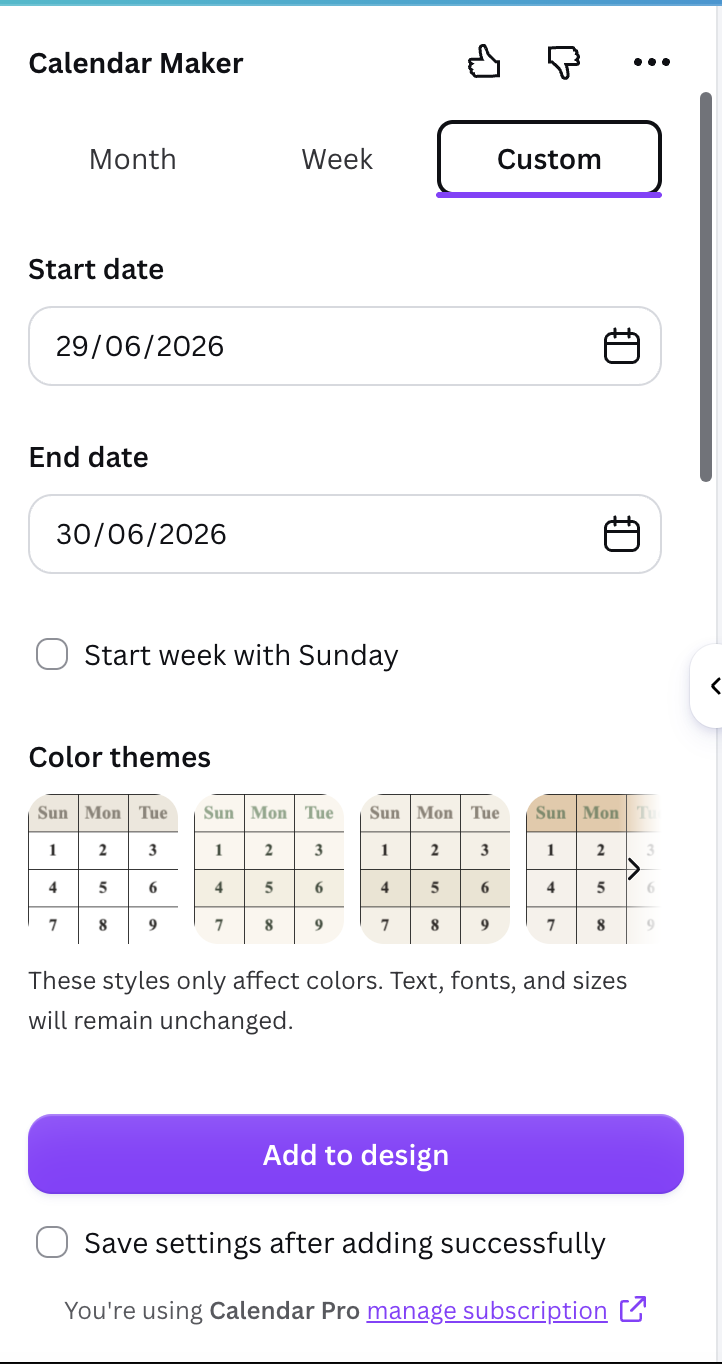
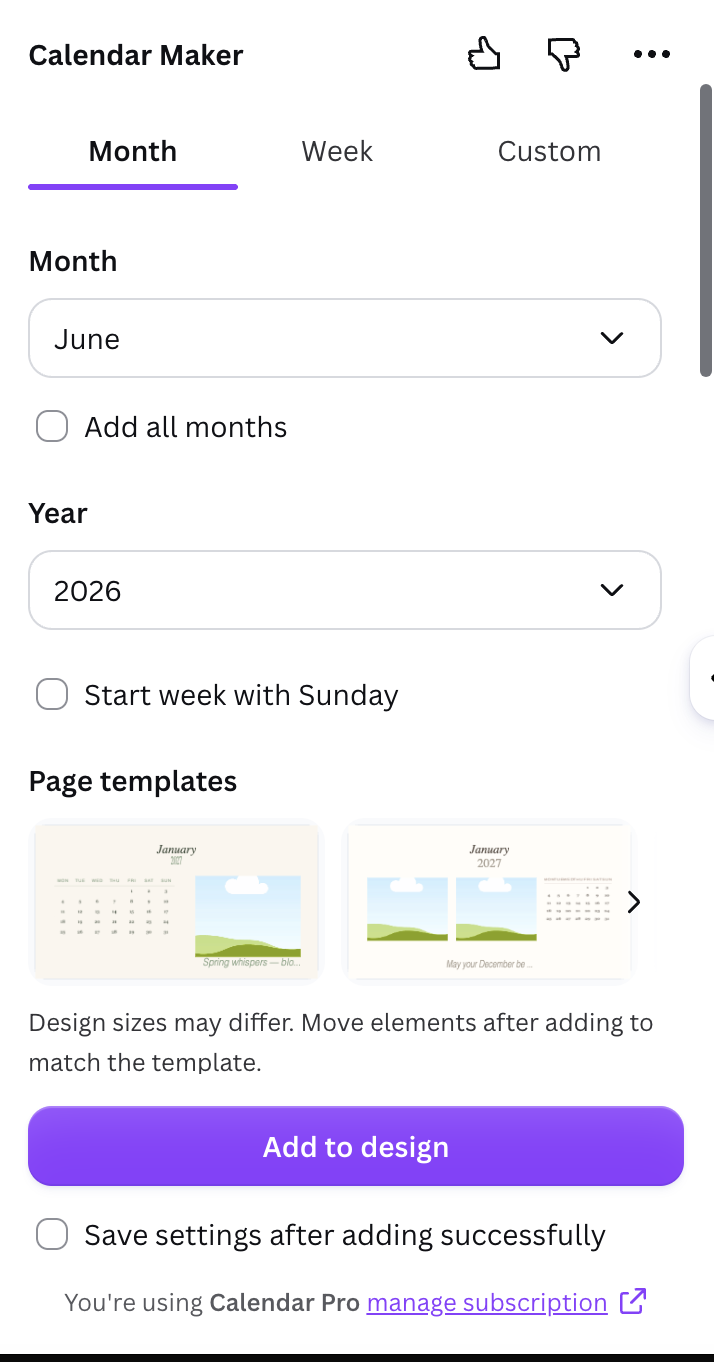
- Open Calendar Maker. From the Apps panel, search for Calendar Maker and open it. You'll see three tabs: Month, Week and Custom.
- Choose your approach.
- Month tab for one month per page: pick the month and year, generate, and repeat for August 2026 through June 2027. Turn on Start week with Sunday if your school uses a Sunday-first layout.
- Custom tab for a semester on a single page: set a start date and end date. The date range is limited to 150 days, so split the year into two semesters, for example mid-August to mid-December and early January to late May.
- Style it once. Pick a color theme from the example styles, set the header and number fonts, and adjust the alternating row colors. Turn on Save settings after adding successfully so every later month uses the same look.
- Add to design. Click Add to design. Calendar Maker inserts the grid into your page with the correct dates and weekdays.
- Mark the key dates. Add colored shapes or text over the days that matter: first and last day of school, holidays, parent-teacher nights, exam weeks. Use one color per type of date, for instance green for breaks and red for exams.
- Add a legend. A small box at the bottom explaining your colors saves everyone from guessing.
- Download. Choose PDF Print for printing, or PNG/PDF Standard for sharing digitally.
Tips for a calendar people actually use #
- Pick one start day and stay consistent. Mixing Sunday-first and Monday-first pages confuses readers.
- Keep fonts to two. One for headers, one for numbers.
- Print one test page before running a full set, so you can check that holiday highlights are readable in grayscale.
- Leave white space. Parents often write on the printed copy, so don't fill every cell.
- Use saved setups. Reopen a saved setup next year and just change the year.
Calendar Maker vs the Canva built-in options #
| Option | Best for | Limitation |
|---|---|---|
| Canva calendar templates | Quick calendar-year designs | Start month and layout are hard to change |
| Canva table element | Total manual control | You type every date yourself |
| Calendar Maker | Any month, week or custom range, correct dates | Custom range capped at 150 days, so use two semesters |
If you only need one ready-made look, a template is fine. If you need accurate dates in a school-year order, generating the months is quicker and less error-prone.
Make it feel finished #
Add a header with the school or class name, a small border from a decorative frame, and the term dates at the top of each page. A QR code linking to the online school calendar is a nice touch for the printed copy.
Frequently asked questions #
Can Calendar Maker start a calendar in August? Yes. In the Month tab you pick any month and year, so you can generate August 2026 through June 2027 as separate pages.
How long can a custom date range be? Up to 150 days, so use two ranges to cover a full school year.
Can I reuse my styling next year? Yes. Save your setup and reopen it later, then change only the dates.
Frequently asked questions
Yes. In the Month tab you pick any month and year, so you can generate August 2026 through June 2027 as separate pages.
Up to 150 days, so use two ranges, one per semester, to cover a full school year.
Yes. Save your setup and reopen it later, then change only the dates.
Related products


More from QRdy Blog
What Is a Stencil? Meaning, Types, and How to Turn a Stencil Shape into a Canva Frame
A stencil is a cut-out template that lets paint or ink pass through only where you want it. Learn how stencils work, the main types, and how to turn a stencil shape into a photo frame in Canva.

Throw Pillow Mockup Ideas for Etsy Home Decor Shops (7 Real Examples)
Seven throw pillow mockup ideas for Etsy home decor shops, from florals to gingham to photo prints, each with a real render made from one plain pillow photo in a single batch, plus tips on fit, folds and listing workflow.

10 Christmas Photo Frame Ideas You Can Make in Canva (Shaped, Printable)
Ten Christmas photo frame ideas for Canva: star, tree, mitten and bauble windows, a Frames Lab burst, a photo-letter JOY banner, plus print tips and where Canva's built-in frames are enough.